



Enter your ZIP code:

Please enter a 5 digit zipcode
No results...

Entering your zip code helps us to provide information and results that are more relevant to you.

Your privacy is important to us. By continuing, you agree to our Privacy Policy.


Ambulatory Tool for Leadership, Assessment, and Strategy banner

Ambulatory Tool for Leadership, Assessment, and Strategy (ATLAS)

ATLAS compass icon graphic - What is ATLAS?

ATLAS is an Excel-based tool designed to help ambulatory infection prevention and control (IPC) programs understand the workload, program capacity, and resource allocation needs for oversight of ambulatory care. 

This tool will provide a way to:  
  1. Assess available ambulatory IPC hours
  2. Characterize ambulatory clinic/areas by risk and complexity
  3. Assess workload and hours by defined IPC activities
  4. Review a gap analysis of demand versus available resources
  5. Visualize graphics and data to support FTE requests

ATLAS doctor icon graphic - Is ATLAS right for you?

ATLAS is right for you if:

  • You are building a new ambulatory IPC program
  • You aim to strengthen and right-size your developing ambulatory IPC program
  • Your ambulatory footprint is outpacing your IPC program
  • You are performing an evaluation of your ambulatory IPC program resources and efficiency 
  • You want to re-organize or re-prioritize how your effort is spent on ambulatory IPC activities 

ATLAS arrow icon graphic - Why ATLAS?

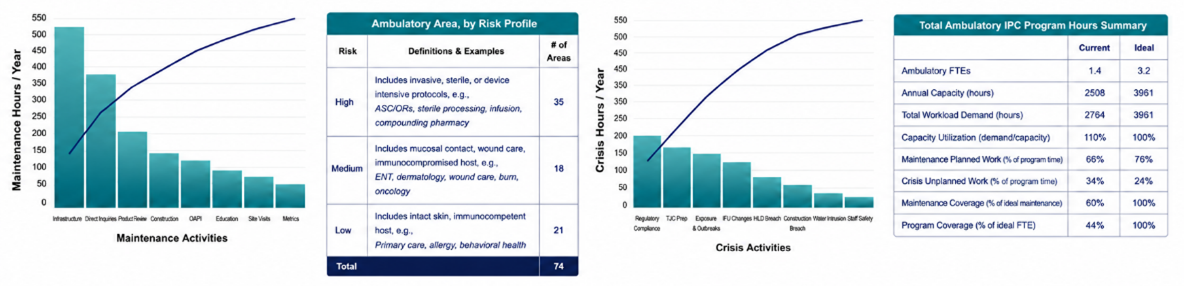
Examples of pareto charts and tables that ATLAS provides

ATLAS

  • Practical and easy to use
  • Generates figures and graphs from your data
  • Identifies gaps Helps you make the case for additional resources 
  • Customizable

Other tools

  • Are based on acute care beds
  • Do not account for differences in clinic risks
  • Assume stable workloads
  • Do not quantify time demand

ATLAS clipboard and checklist icon graphic - How do I get started?

Step 1:

Download ATLAS Version 1.

Step 2:

Identify a time period that represents your typical workload (e.g., three months, six months, one year). 

Step 3:

Review your ambulatory IPC program activities for that period and enter time spent on those activities. For example: An academic medical center with 74 clinics spent two days reviewing their ambulatory IPC program activities in 2024.

Step 4:

Once user inputs are complete, review your output summary:

  • Current workload
  • Time spent on activities that consume your resources the most
  • Identify ambulatory IPC program needs

ATLAS book and chart icon graphic - Resources and references

  • Get ATLAS Version 1
  • Get ATLAS User Guide
  • The UCI Health APIC 2026 Poster